Code
import numpy as np
from datascience import *
%matplotlib inline

rent = Table().with_columns(
  "Dollars", np.append(np.append(np.append(np.ones(15) * 600, np.ones(25) * 900), np.ones(40) * 1100), np.ones(20) * 1400)
)| Name | Wesley Zheng |
| Pronouns | He/him/his |
| wzheng0302@berkeley.edu | |
| Discussion | Wednesdays, 12–2 PM @ Etcheverry 3105 |
| Office Hours | Tuesdays/Thursdays, 2–3 PM @ Warren Hall 101 |
Contact me by email at ease — I typically respond within a day or so!
Histograms help us understand the distribution of one numerical variable. They show how spread out the data is and where it tends to cluster.
Histograms vs. Bar Charts
The X-Axis
The Y-Axis
The table below shows the distribution of rents paid by students in Boston. The first column consists of ranges of monthly rent, in dollars. Ranges include the lower bound but not the upper bound. The second column shows the percentage of students who pay rent in each of the ranges.
import numpy as np
from datascience import *
%matplotlib inline
rent = Table().with_columns(
"Dollars", np.append(np.append(np.append(np.ones(15) * 600, np.ones(25) * 900), np.ones(40) * 1100), np.ones(20) * 1400)
)Area Principle: The area of a bin is equal to the percentage of data in that bin. The larger the area, the more data lies in that bin.
\[ \text{Area of a bar} = \% \text{ of values in a bin} = \text{width of the bin} \times \text{height of the bin} \]
Calculate the heights of the bars for the bins listed in the table, with correct units. Recall the Area Principle:
| Dollars | Students (%) | Bar Height |
|---|---|---|
| 500 – 800 | 15 | |
| 800 – 1000 | 25 | |
| 1000 – 1200 | 40 | |
| 1200 – 1600 | 20 |
| Dollars | Students (%) | Bar Height |
|---|---|---|
| 500 – 800 | 15 | 0.050% |
| 800 – 1000 | 25 | 0.125% |
| 1000 – 1200 | 40 | 0.200% |
| 1200 – 1600 | 20 | 0.050% |
Draw a histogram of the data. Make sure you label your axes!
A larger area does not always mean a taller bar.
This is why you should always connect the shape of the histogram back to the area principle.
rent.hist("Dollars", bins = [500, 800, 1000, 1200, 1600])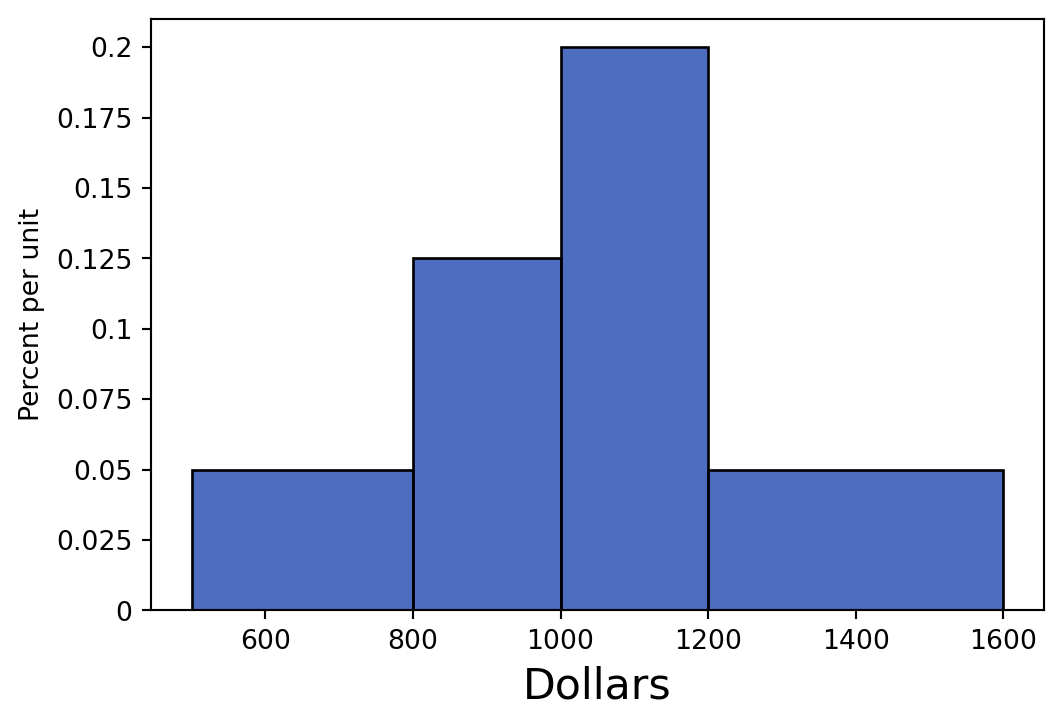
True or False: If we combine the [500, 800) and [800, 1000) bins together, the height of the new bin would be greater than the heights of both of the old bins. Please explain your answer.
False: When we combine bins together, the height of the new bin is the weighted average of the old bin heights. Thus, the new bin height will be greater than the [500, 800) bin, but less than the [800, 1000) bin. If we calculate the new height, it will be:
\(\text{new height}\) = \(\frac{area}{width} = \frac{40\%}{(\$800 - \$500) + (\$1000 - \$800)} = 0.08\%\) per dollar
When two bins are combined, the new height is like an average.
rent.hist("Dollars", bins = [500, 1000, 1200, 1600])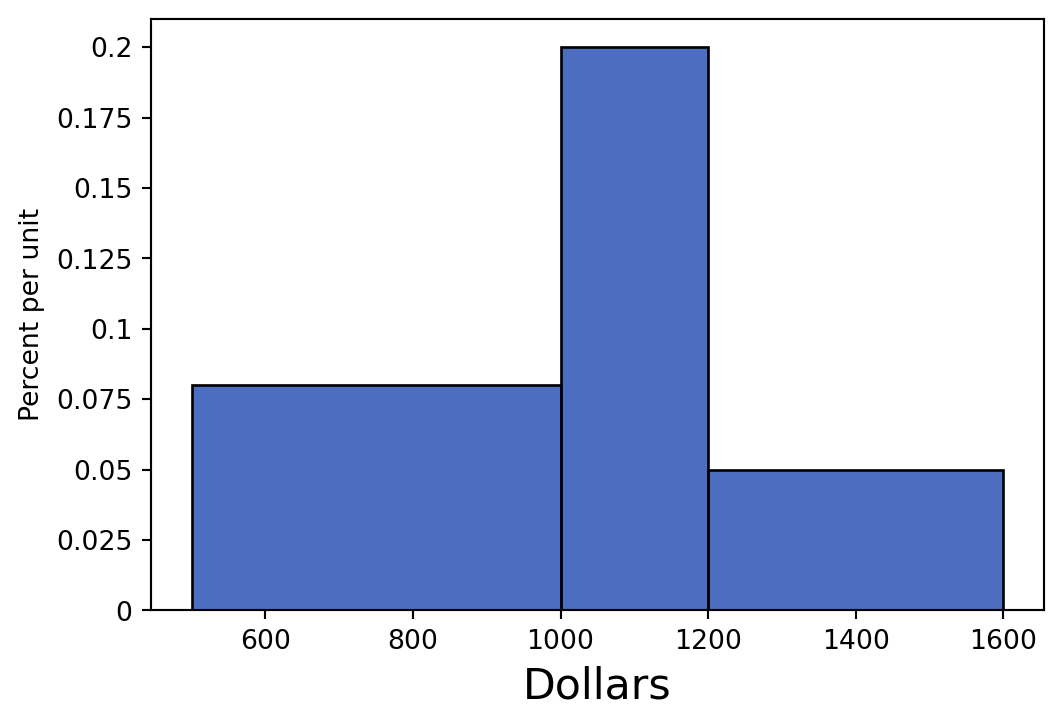
import warnings
warnings.filterwarnings("ignore")
import randomAfter learning about them in Data 8, Tim wants to write a function that can calculate the hypotenuse of any right triangle. He wants to use his function to assign C to the hypotenuse of a right triangle with legs (sides adjacent to the hypotenuse) A and B. However, he’s made many mistakes. Which ones can you identify?
Hint: There are 5 unique issues. Assume that numpy has been imported as np.
A = 3
B = 4
def hypotenuse(a, b)
squares = make_array(side1, side2) * 2
sum = sum(squares)
squareroot = np.sqrt(sum)
print(squareroot)
C = hypotenuse(A, B) # C should be the numerical resultIssue 1: the function is missing a colon : after the arguments list.
def hypotenuse(a, b)
  squares = make_array(side1, side2) * 2
  sum = sum(squares)
  squareroot = np.sqrt(sum)
  print(squareroot)
C = hypotenuse(A, B) # C should be the numerical resultCell In[6], line 1 def hypotenuse(a, b) ^ SyntaxError: expected ':'
Issue 2: squares should be squared with ** not *
Issue 3: We need to be consistent with our argument names so they get accurately assigned throughout the function. We can either replace a and b with side1 and side2, or vice versa.
def hypotenuse(a, b):
  squares = make_array(side1, side2) * 2
  sum = sum(squares)
  squareroot = np.sqrt(sum)
  print(squareroot)
C = hypotenuse(A, B) # C should be the numerical result
--------------------------------------------------------------------------- NameError Traceback (most recent call last) Cell In[7], line 6 4 squareroot = np.sqrt(sum) 5 print(squareroot) ----> 6 C = hypotenuse(A, B) # C should be the numerical result Cell In[7], line 2, in hypotenuse(a, b) 1 def hypotenuse(a, b): ----> 2 squares = make_array(side1, side2) * 2 3 sum = sum(squares) 4 squareroot = np.sqrt(sum) NameError: name 'side1' is not defined
Issue 4: The function will print the value of squareroot but will not return it, which means we will not have access to the value of squareroot anymore. That is, we will not be able to assign it to any values or use it as the argument to any functions! In this case, C will not be equal to anything (it will actually be None)!
It’s important to understand the difference between return and print.
print just displays something on the screen—it doesn’t give you back a usable value. In fact, it returns None.return gives back a value you can save in a variable and use later.If you want to keep and work with the result of a function, you should use return.
Inside a function:
* Argument names are placeholders—they can be named anything, but they must be used consistently within the function.
* Variables defined inside the function exist only inside the function. They disappear once the function finishes running.
This is called scope.
Issue 5: When we assign sum to a number we have lost the original behavior of the built-in sum function. We should not re-assign variable names. (Note: in this specific question the redefined sum is a local variable and is only scoped within the hypotenuse function, though this is out of scope of Data 8. You should generally never override any function name, regardless of the scope of the variable.)
Avoid using protected names like sum or max.
def hypotenuse(a, b):
  squares = make_array(a, b) * 2
  sum = sum(squares)
  squareroot = np.sqrt(sum)
  print(squareroot)
C = hypotenuse(A, B) # C should be the numerical result
--------------------------------------------------------------------------- UnboundLocalError Traceback (most recent call last) Cell In[8], line 6 4 squareroot = np.sqrt(sum) 5 print(squareroot) ----> 6 C = hypotenuse(A, B) # C should be the numerical result Cell In[8], line 3, in hypotenuse(a, b) 1 def hypotenuse(a, b): 2 squares = make_array(a, b) * 2 ----> 3 sum = sum(squares) 4 squareroot = np.sqrt(sum) 5 print(squareroot) UnboundLocalError: cannot access local variable 'sum' where it is not associated with a value
def hypotenuse(a, b):
  squares = make_array(a, b) * 2
  sum_of_squares = sum(squares)
  squareroot = np.sqrt(sum_of_squares)
  print(squareroot)
C = hypotenuse(A, B) # C should be the numerical result
print(C) # C is actually None now!
3.74165738677
NoneFully correct implementation of the function should be:
def hypotenuse(a, b):
  squares = make_array(a, b) * 2
  sum_of_squares = sum(squares)
  squareroot = np.sqrt(sum_of_squares)
  return squareroot
C = hypotenuse(A, B) # C should be the numerical result
C3.7416573867739413Write a function that takes in the following arguments:
tbl: a table.col: a string, name of a column in tbl.n: an int.The function should return a table that contains the rows that have the \(n\) largest values for the specified column.
def top_n(tbl, col, n):
  sorted_tbl = __________________________________________________
  top_n_rows = __________________________________________________
return ________________________________________________________def top_n(tbl, col, n):
sorted_tbl = tbl.sort(col, descending = True)
top_n_rows = sorted_tbl.take(np.arange(n))
return top_n_rowstable = Table().with_columns(
"Some Column", [10, 1, 100, 10000, 1000]
)
table| Some Column |
|---|
| 10 |
| 1 |
| 100 |
| 10000 |
| 1000 |
top_n(table, "Some Column", 3)| Some Column |
|---|
| 10000 |
| 1000 |
| 100 |
Dagny’s favorite activity to celebrate Fridays is buying pastries at Sheng Kee before class. She stores her purchase data in a table, pastries, to keep track of her spending. Assume she never purchases the same item twice. Each row represents an individual purchase. The first few rows look like this:
pastries = Table().with_columns(
    'item', ['Hot Dog Bun', 'Yudane Milk Bun', 'Summer Romance', 'Pineapple Bun', 'Ham and Cheese Croissant'],
    'category', ['Savory', 'Sweet', 'Sweet', 'Sweet', 'Savory'],
    'price', [2.75, 2.99, 2.79, 2.45, 3.15],
    'satisfaction', [8.5, 9.0, 10.0, 7.75, 7.25]
)

pastries| item | category | price | satisfaction |
|---|---|---|---|
| Hot Dog Bun | Savory | 2.75 | 8.5 |
| Yudane Milk Bun | Sweet | 2.99 | 9 |
| Summer Romance | Sweet | 2.79 | 10 |
| Pineapple Bun | Sweet | 2.45 | 7.75 |
| Ham and Cheese Croissant | Savory | 3.15 | 7.25 |
The table has 4 columns:
Working with tables involves a wide set of operations:
.column(), .with_columns(), .where(), .sort(), .group(), .apply()tbl.take()np.mean() and np.arange()These tools let us create new columns, operate on them, and select multiple rows at once. Practicing these now will make exam-style questions much easier.
Write a line of code to calculate the average satisfaction Dagny felt after eating sweet pastries.
_________(pastries._______(__________________).column(________))
np.mean(pastries.where('category', are.equal_to('Sweet')).column('satisfaction'))8.9166666666666661Dagny is curious if the average price for savory pastries is higher than the average price for sweet pastries. Write a line of code that will output the category that is more expensive.
pastries.__________________(____________________, ____________________)
        .sort(___________________________, ___________________________)
.column(_________________________________________).item(______)pastries.group("category", np.mean).sort("price mean", descending=True).column("category").item(0)'Savory'.group is price mean. The .sort must take in the correct column name. Alternatively you may use the index of the column after grouping.
Dagny’s budget is getting tight, and she wants to buy pastries that will give her the most satisfaction per dollar. Write lines of code that will help us achieve this.
First, create an array that contains each purchase’s satisfaction per dollar. Then, add a new column called “satisfaction per $”, to the pastries table.
score_array = pastries._______(_________) / pastries._______(_________)
pastries = ______.with_column(_____________, __________________)score_array = pastries.column('satisfaction') / pastries.column('price')
pastries = pastries.with_column('satisfaction per $', score_array)pastries| item | category | price | satisfaction | satisfaction per $ |
|---|---|---|---|---|
| Hot Dog Bun | Savory | 2.75 | 8.5 | 3.09091 |
| Yudane Milk Bun | Sweet | 2.99 | 9 | 3.01003 |
| Summer Romance | Sweet | 2.79 | 10 | 3.58423 |
| Pineapple Bun | Sweet | 2.45 | 7.75 | 3.16327 |
| Ham and Cheese Croissant | Savory | 3.15 | 7.25 | 2.30159 |
Dagny defines a function score that takes in satisfaction and price (in that order) and returns the satisfaction per dollar. Find a different way to compute score_array.
score_array = pastries._________________(__________________, __________________, __________________)
def score(satisfaction, price):
return satisfaction / pricescore_array = pastries.apply(score, "satisfaction", "price")score_arrayarray([ 3.09090909, 3.01003344, 3.58422939, 3.16326531, 2.3015873 ])Dagny is interested in finding the pastries in the table with the top 3 satisfaction values per dollar. Write code that will output the names of these items as an array.
pastries_sorted = pastries.__________(__________, __________)
pastries_sorted.__________(__________).column(__________)pastries_sorted = pastries.sort('satisfaction per $', descending = True)
pastries_sorted.take(np.arange(3)).column('item')array(['Summer Romance', 'Pineapple Bun', 'Hot Dog Bun'],
dtype='<U24')Write a line of code to calculate the total amount Samiksha spent on pastries. Assume all of her pastry purchases are recorded in the table.
sum(pastries.column('price'))14.130000000000001The table insurance contains one row for each beneficiary that is covered by a particular insurance company:
insurance = Table.read_table("insurance.csv")
insurance.show(3)| age | bmi | smoker | region | cost |
|---|---|---|---|---|
| 25 | 20.8 | no | southwest | 3208.79 |
| 25 | 30.2 | yes | southwest | 33900.7 |
| 62 | 32.1 | no | northeast | 1355.5 |
... (20198 rows omitted)
The table contains five columns:
int): the age of the beneficiary.float): the Body Mass Index (BMI) of the beneficiary.string): indicates whether the beneficiary smokes.string): the region of the United States where the beneficiary lives.float): the total amount in medical costs that the insurance company paid for this beneficiary last year.(Fall 2018 Midterm Question 2 Modified)
In each part below, fill in the blanks to achieve the desired outputs.
A scatter plot comparing the amount paid last year vs. BMI (titles are usually written as Y vs. X) for only the beneficiaries whose costs exceeded $25,000. Each dot on the scatter plot should represent one beneficiary.
high_cost = _________.______(_______, _______________________)
_____.___________(__________________, _________________)high_cost = insurance.where("cost", are.above(25000))
high_cost.scatter("bmi", "cost")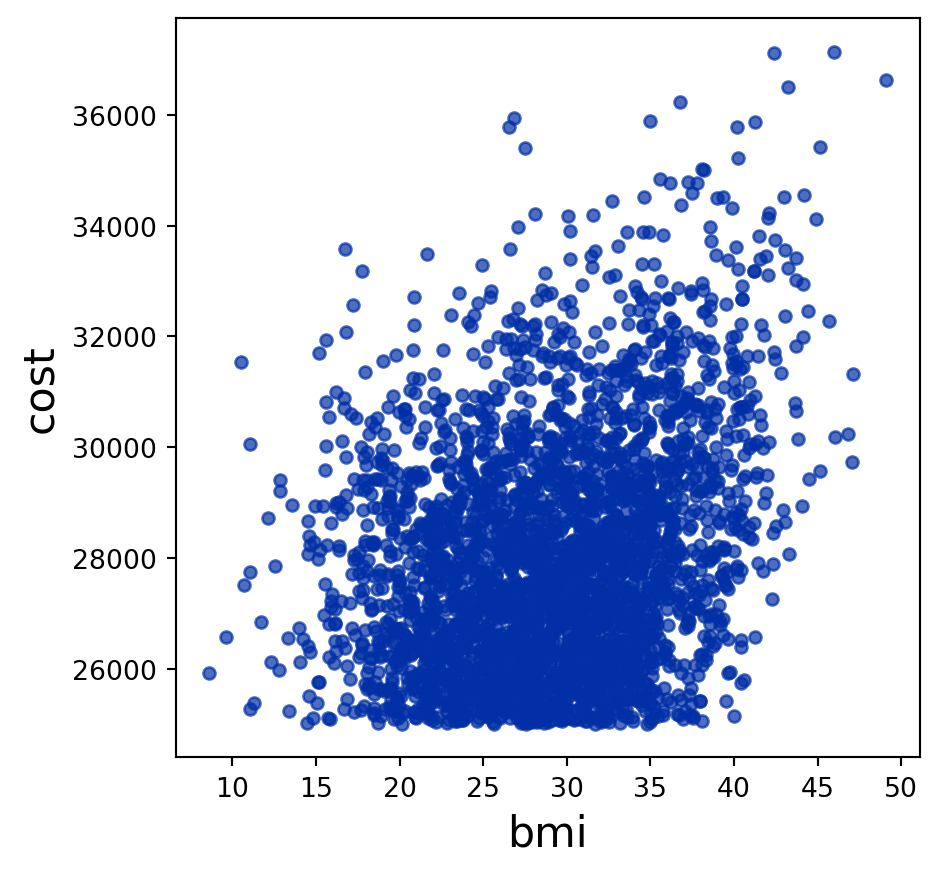
Write a function that takes an age as an argument, and returns the average BMI among all beneficiaries of that age.
Functions are a critical part of working with tables.
def average_bmi(age):
  right_age = insurance.where(________________, ________________)
  bmis = right_age._______________(______________)
  avg = sum(bmis) / len(bmis)
_____________________________________def average_bmi(age):
right_age = insurance.where("age", age)
bmis = right_age.column("bmi")
avg = sum(bmis) / len(bmis)
return avg average_bmi(30)28.487799043062214