15  Discussion 13: Intervals for Predictions & kNN Classification (from Fall 2025)

15.0.1 Contact Information

Name Wesley Zheng
Pronouns He/him/his
Email wzheng0302@berkeley.edu
Discussion Wednesdays, 12–2 PM @ Etcheverry 3105
Office Hours Tuesdays/Thursdays, 2–3 PM @ Warren Hall 101

Contact me by email at ease — I typically respond within a day or so!


15.0.2 Announcements

CautionAnnouncements
  • Interested in becoming part of the course staff? Applications are open — we encourage you to apply!
  • Project 3 Party coming up! Stay tuned for details and make sure to join in.
  • Please remember to complete your course evaluations — your feedback matters!

15.1 Confidence Intervals for Predictions

NotePrediction vs. Confidence Intervals

A confidence interval and a prediction interval measure two different kinds of uncertainty.

  • A Confidence Interval estimates a population parameter, like the average battery life for all laptops of a certain price. It answers the question: “How certain are we about the location of the true regression line?”

  • A Prediction Interval estimates a single future observation. It answers the question: “Where do we think the battery life of the next individual laptop will fall?”

Milena is looking to buy a new laptop for her birthday. She has a table laptops with information on different laptops with two columns:

  • price (float): the price of the laptop in US dollars.
  • battery life (float): the battery life of the laptop in hours.
Code
from datascience import *
import numpy as np
%matplotlib inline
np.random.seed(42)

price = make_array(
    750, 780, 790, 820, 830, 850, 870, 880, 885, 920, 930, 950, 955, 970, 
    980, 990, 1000, 1005, 1010, 1020, 1030, 1050, 1055, 1060, 1065, 1070, 
    1080, 1080, 1085, 1090, 1100, 1105, 1120, 1125, 1130, 1150, 1155, 
    1180, 1280, 1320, 1380, 1420
)

battery_life = make_array(
    8.0, 8.2, 7.8, 8.5, 9.2, 10.0, 8.0, 11.0, 10.2, 10.0, 7.5, 5.3, 10.8, 
    6.8, 10.5, 8.2, 10.2, 8.8, 11.2, 9.0, 8.8, 12.0, 10.8, 11.5, 9.2, 
    10.4, 13.1, 10.2, 8.8, 11.0, 11.9, 9.5, 10.5, 8.5, 10.3, 11.5, 9.0, 
    12.2, 7.8, 12.5, 10.4, 13.2
)

laptop_data = Table().with_columns(
    'price', price,
    'battery life', battery_life
)
15.1.1 (a)

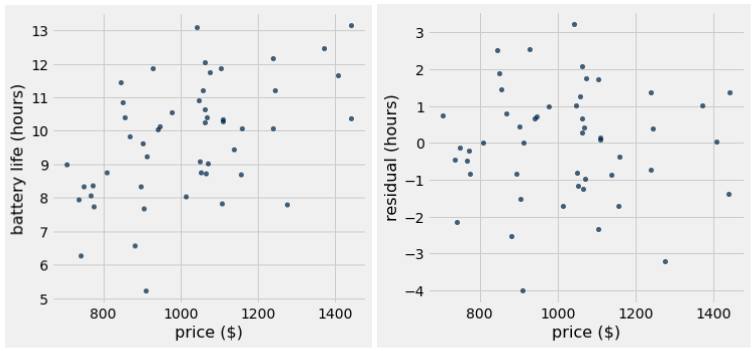
Inspect the following scatter plot and residual plot of Milena’s data. Would using linear regression be appropriate for this dataset?

Answer Yes. The scatter plot exhibits a roughly linear relationship. The residual plot does not show any trend or pattern, and the residuals seem to add up to 0.

15.1.2 (b)

Milena wants to use a regression line to predict the battery life of a laptop given the price. Define the fitted_value function below which takes in the following arguments:

  • table (Table): a table with the data points used to generate the regression line.
  • x (string): the column name for the x variable.
  • y (string): the column name for the y variable.
  • x0 (float): the x value we want to make a prediction at.

The function should return a float by using a regression line to predict a y-value for the given x-value. Assume the slope(tbl, x, y) and intercept(tbl, x, y) functions are defined as in lecture.

Code
def convert_su(data):
  sd = np.std(data)
  avg = np.mean(data)
  return (data - avg) / sd

def calculate_correlation(tbl, x, y):
  x_su = convert_su(tbl.column(x))
  y_su = convert_su(tbl.column(y))
  return np.mean(x_su * y_su)

def slope(tbl, x, y):
  return calculate_correlation(tbl, x, y) * np.std(tbl.column(y)) / np.std(tbl.column(x))

def intercept(tbl, x, y):
  return np.mean(tbl.column(y)) - slope(tbl, x, y) * np.mean(tbl.column(x))
def fitted_value(tbl, x, y, x0):
  m = ______________________________________________
  b = ______________________________________________
  __________________________________________________
Answer
def fitted_value(table, x, y, x0):
    m = slope(table, x, y)
    b = intercept(table, x, y)
    return m * x0 + b
fitted_value(laptop_data, "price", "battery life", laptop_data.column(0))
array([  8.28389047,   8.447352  ,   8.50183918,   8.66530071,
         8.71978789,   8.82876225,   8.9377366 ,   8.99222378,
         9.01946737,   9.21017249,   9.26465967,   9.37363402,
         9.40087761,   9.48260838,   9.53709555,   9.59158273,
         9.64606991,   9.6733135 ,   9.70055709,   9.75504426,
         9.80953144,   9.9185058 ,   9.94574938,   9.97299297,
        10.00023656,  10.02748015,  10.08196733,  10.08196733,
        10.10921092,  10.13645451,  10.19094168,  10.21818527,
        10.29991604,  10.32715963,  10.35440322,  10.46337757,
        10.49062116,  10.6268391 ,  11.17171088,  11.38965959,
        11.71658265,  11.93453136])

15.1.3 (c)

Assume the average price of a laptop in Milena’s dataset is $1,000. Milena generates 90% confidence intervals for the predicted battery life of laptops priced at $1,100 and $700.

15.1.3.1 (i)

Which one of these two intervals do we expect to be wider? Why?

Answer

The interval for laptops priced at $700 is wider. This is because $700 is further from the mean of $1,000. The further the \(x\) value is from the mean \(x\) value, the wider our prediction interval is. See section 16.3 of the textbook for more details!

Code
for value in [1100, 700]:
  values = make_array()
  for _ in range(1000):
    laptop_data_bootstrapped = laptop_data.sample()
    m = slope(laptop_data_bootstrapped, "price", "battery life")
    b = intercept(laptop_data_bootstrapped, "price", "battery life")
    prediction = m * value + b
    values = np.append(values, prediction)
  lower_bound = np.percentile(values, 5)
  upper_bound = np.percentile(values, 95)
  print(f"90% Prediction interval for price {value}: [{lower_bound}, {upper_bound}]")
90% Prediction interval for price 1100: [9.783174847603952, 10.647453453187786]
90% Prediction interval for price 700: [7.168786200829331, 8.819116152172679]
NoteWhy Intervals Widen Away From the Mean

Prediction intervals are narrowest at the mean of your data and get wider the further you move away from it.

Think of the regression line as a seesaw balanced on a pivot point. This pivot is at the center of your data: \((\bar{x}, \bar{y})\).

  • Near the Center: When you predict for an \(x\) value near the mean (\(\bar{x}\)), you’re close to the pivot. A small wobble in the seesaw’s angle (uncertainty in the slope) doesn’t change the height very much. We are more certain here.

  • Far from the Center: When you predict for an \(x\) value far from the mean, you’re at the end of the seesaw. Now, the same small wobble in the slope results in a much larger change in height. This increased sensitivity adds more uncertainty, making the interval wider.

15.1.3.2 (ii)

Does the answer to the previous part change if we used a different confidence level? Why or why not?

Answer

Our answer does not change. If we use a different confidence level, both the interval at $1,100 and $700 will change in width, but the $700 interval will always be wider. The confidence level we use doesn’t impact the reasoning we used in part (i).

Code
for value in [1100, 700]:
  values = make_array()
  for _ in range(1000):
    laptop_data_bootstrapped = laptop_data.sample()
    m = slope(laptop_data_bootstrapped, "price", "battery life")
    b = intercept(laptop_data_bootstrapped, "price", "battery life")
    prediction = m * value + b
    values = np.append(values, prediction)
  lower_bound = np.percentile(values, 2.5)
  upper_bound = np.percentile(values, 97.5)
  print(f"95% Prediction interval for price {value}: [{lower_bound}, {upper_bound}]")
95% Prediction interval for price 1100: [9.620569165414919, 10.733213340412496]
95% Prediction interval for price 700: [7.003456697673132, 9.041970188661214]

15.1.4 (d)

Milena believes that a laptop with a price of $1,300 should have a battery life of 14 hours. Complete the following code to test her hypothesis with a 4% p-value cutoff. Assume Milena has properly simulated 1,000 predicted battery lives for a laptop with price $1,300 and stored them in the array called predictions.

Code
predictions = make_array()
for _ in range(1000):
  laptop_data_bootstrapped = laptop_data.sample()
  m = slope(laptop_data_bootstrapped, "price", "battery life")
  b = intercept(laptop_data_bootstrapped, "price", "battery life")
  prediction = m * 1300 + b
  predictions = np.append(predictions, prediction)
left = __________________________________________
right = _________________________________________
if _____________________________________________:
  print("Fail to reject the null")
else:
  print(_____________________________________________)
Answer
left = percentile(2, predictions)
right = percentile(98, predictions)

if left <= 14 <= right:
    print("Fail to reject the null hypothesis")
else:
    print("Reject the null hypothesis")
Reject the null hypothesis
NotePython Tip: Chained Comparisons

When you need to check if a value is between a lower and an upper bound, you can use Python’s convenient chained comparison syntax.


15.1.5 (e)

For this question, assume we have a similar dataset to before, but the data is well suited for linear regression and the range of prices are between $0 and $1500. You find the correlation between price and battery life to be \(r\) = 0.8.

NoteTip: Use the Regression Formula

Problems involving regression predictions can seem intimidating at first. The key is to break them down and rely on the fundamental regression formula:

predicted y = (slope * x) + intercept

Don’t get lost in the complex setup. Focus on the core steps: 1. Calculate the slope (\(m\)). 2. Calculate the y-intercept (\(b\)). 3. Plug your given x-value into the formula.

By following these steps, the answer becomes much clearer.

Code
new_prices = np.random.uniform(low=0, high=1450, size=58)
predicted_new_life = slope(laptop_data, "price", "battery life") * new_prices + intercept(laptop_data, "price", "battery life")
residuals = laptop_data.column("battery life") - fitted_value(laptop_data, "price", "battery life", laptop_data.column("price"))
random_noise = np.random.choice(residuals, size=58, replace=True)
new_battery_life = predicted_new_life + random_noise
new_prices = np.append(new_prices, price)
new_battery_life = np.append(new_battery_life, battery_life)
new_laptop_data = Table().with_columns(
    'price', new_prices,
    'battery life', new_battery_life
)

15.1.5.1 (i)

A 90% prediction interval for a laptop with price $0 will have nearly the same lower and upper bounds as a 90% confidence interval for the intercept of the true line in original units.

Answer

Computing the prediction interval at a given x of 0 is the same as computing the confidence interval for the y-intercept. If our line of best fit is \(y = mx + b\), then for a given \(x\) of \(0\), the equation becomes \(y = b\), which is just the intercept.

Code
predictions_0 = make_array()
for _ in range(1000):
    laptop_data_bootstrapped = laptop_data.sample()
    m = slope(laptop_data_bootstrapped, "price", "battery life")
    b = intercept(laptop_data_bootstrapped, "price", "battery life")
    prediction = m * 0 + b
    predictions_0 = np.append(predictions_0, prediction)
lower_bound_0 = np.percentile(predictions_0, 5)
upper_bound_0 = np.percentile(predictions_0, 95)
print(f"90% Prediction interval for price 0: [{lower_bound_0}, {upper_bound_0}]")

predictions_intercept = make_array()
for _ in range(1000):
    laptop_data_bootstrapped = laptop_data.sample()
    b = intercept(laptop_data_bootstrapped, "price", "battery life")
    predictions_intercept = np.append(predictions_intercept, b)
lower_bound_intercept = np.percentile(predictions_intercept, 5)
upper_bound_intercept = np.percentile(predictions_intercept, 95)
print(f"90% Confidence interval for intercept: [{lower_bound_intercept}, {upper_bound_intercept}]")
90% Prediction interval for price 0: [1.7477034647010687, 6.8624356212747495]
90% Confidence interval for intercept: [1.8984973005181354, 6.817316729042883]

15.1.5.2 (ii)

A 90% prediction interval for a laptop with price 1 in standard units will have nearly the same lower and upper bounds (in standard units) as a 90% confidence interval for the true correlation.

Answer

In standard units, the line of best fit is \(y = r \cdot x\). If our given \(x\) value is 1, then the equation becomes \(y = r\), which is just the correlation coefficient.

Code
predictions_1sd = make_array()
for _ in range(1000):
    laptop_data_bootstrapped = laptop_data.sample()
    laptop_data_bootstrapped = laptop_data_bootstrapped.with_columns(
        'price', convert_su(laptop_data_bootstrapped.column('price')),
        'battery life', convert_su(laptop_data_bootstrapped.column('battery life'))
    )
    m = slope(laptop_data_bootstrapped, "price", "battery life")
    b = intercept(laptop_data_bootstrapped, "price", "battery life")
    prediction = m * 1 + b
    predictions_1sd = np.append(predictions_1sd, prediction)
lower_bound_1sd = np.percentile(predictions_1sd, 5)
upper_bound_1sd = np.percentile(predictions_1sd, 95)
print(f"90% Prediction interval for price 1 in standard units: [{lower_bound_1sd}, {upper_bound_1sd}]")

predictions_correlation = make_array()
for _ in range(1000):
    laptop_data_bootstrapped = laptop_data.sample()
    r = calculate_correlation(laptop_data_bootstrapped, "price", "battery life")
    predictions_correlation = np.append(predictions_correlation, r)
lower_bound_correlation = np.percentile(predictions_correlation, 5)
upper_bound_correlation = np.percentile(predictions_correlation, 95)
print(f"90% Confidence interval for correlation: [{lower_bound_correlation}, {upper_bound_correlation}]")
90% Prediction interval for price 1 in standard units: [0.26198012056566916, 0.6574215615509498]
90% Confidence interval for correlation: [0.26322422376908683, 0.6531946427530163]

15.1.5.3 (iii)

If we constructed one hundred 90% prediction intervals and one hundred 95% prediction intervals for the battery life of a laptop with price $950, we expect less of the 95% prediction intervals to contain the true battery life of a laptop with price $950 than the 90% prediction intervals.

Answer

Each 95% prediction interval that we plan to generate has a 95% chance of containing the true prediction, while each 90% prediction interval only has a 90% chance. We would expect 90 of the 90% prediction intervals to contain the true battery life and 95 of the 95% prediction intervals to contain the true battery life.

Code
true_battery_life = 9
num_95 = 0
for i in range(100):
    predictions = make_array()
    for _ in range(100):
        laptop_data_bootstrapped = laptop_data.sample()
        m = slope(laptop_data_bootstrapped, "price", "battery life")
        b = intercept(laptop_data_bootstrapped, "price", "battery life")
        prediction = m * 950 + b
        predictions = np.append(predictions, prediction)
    lower_bound_95 = np.percentile(predictions, 2.5)
    upper_bound_95 = np.percentile(predictions, 97.5)
    if lower_bound_95 <= true_battery_life <= upper_bound_95:
        num_95 += 1
print(f"{num_95} of the 95% prediction intervals contain the true battery life of a laptop with price $950.")

num_90 = 0
for i in range(100):
    predictions = make_array()
    for _ in range(100):
        laptop_data_bootstrapped = laptop_data.sample()
        m = slope(laptop_data_bootstrapped, "price", "battery life")
        b = intercept(laptop_data_bootstrapped, "price", "battery life")
        prediction = m * 950 + b
        predictions = np.append(predictions, prediction)
    lower_bound_90 = np.percentile(predictions, 5)
    upper_bound_90 = np.percentile(predictions, 95)
    if lower_bound_90 <= true_battery_life <= upper_bound_90:
        num_90 += 1
print(f"{num_90} of the 90% prediction intervals contain the true battery life of a laptop with price $950.")
96 of the 95% prediction intervals contain the true battery life of a laptop with price $950.
63 of the 90% prediction intervals contain the true battery life of a laptop with price $950.
NoteConfidence Levels and Their Tradeoffs

When we change the confidence level of a confidence interval (CI), we are managing a tradeoff between confidence and precision.

Think of it like trying to catch a fish with a net: * A 99% CI is like using a very large net. You are more confident that you’ve captured the true value, but the range of possibilities is wide (less precise). * A 90% CI is like using a smaller net. You are less confident that you’ve captured the true value, but the range is narrower, giving you a more precise estimate.

The Tradeoff: To gain more confidence that your interval contains the true parameter, you must create a wider, less precise interval.

15.2 kNN Classifier

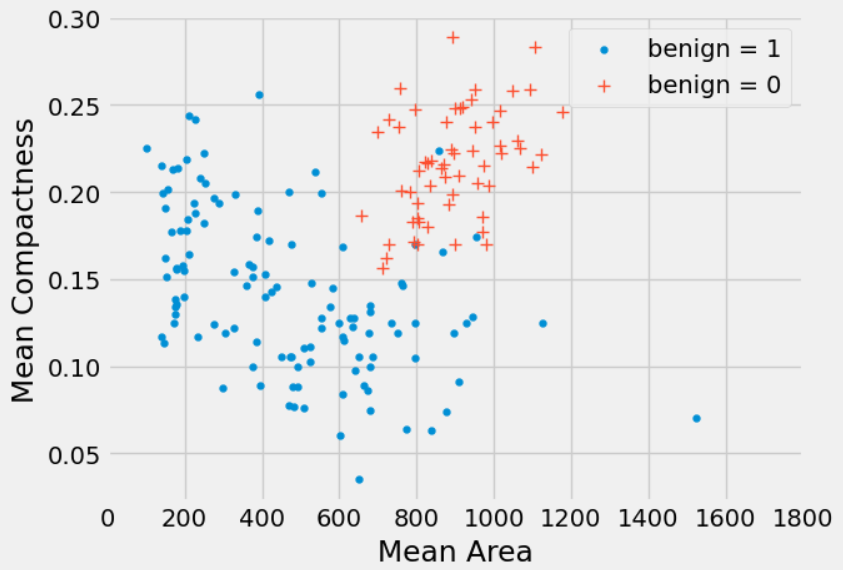
Significant research has been done to understand whether a breast tumor is benign (not cancerous) or malignant (cancerous). Dagny wants to create a classifier that predicts whether a tumor is benign or not.

15.2.1 (a)

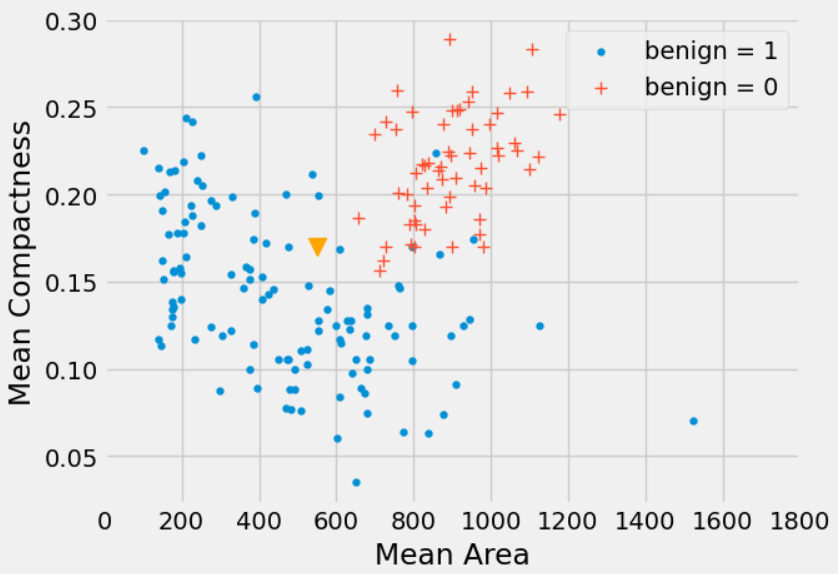
Dagny wants to classify a new tumor (represented as a triangle in the scatter plot). Describe the steps she would take to classify this new point based on a k-nearest neighbors classifier with k = 5.

NoteThe k-Nearest Neighbors (kNN) Algorithm

The kNN algorithm classifies a new data point based on its “neighbors.” The process is a straightforward three-step recipe:

  1. Calculate Distances: Compute the distance (typically Euclidean distance) from the new, unclassified point to every single point in the training set.
  2. Find the Neighbors: Sort the training data points by their calculated distance, from smallest to largest. Select the top k points—these are the “k-nearest neighbors.”
  3. Take a Majority Vote: Look at the class labels of these k neighbors. The new point is assigned the class that appears most frequently among them.
Answer
  • Compute the Euclidean distance between the new point and all the points in our dataset.
  • Sort all the data in increasing order based on the calculated distance.
  • Take the top 5 neighbors and take a majority vote.
In this particular case we can eyeball that the new point should be classified as benign = 1.

15.2.2 (b)

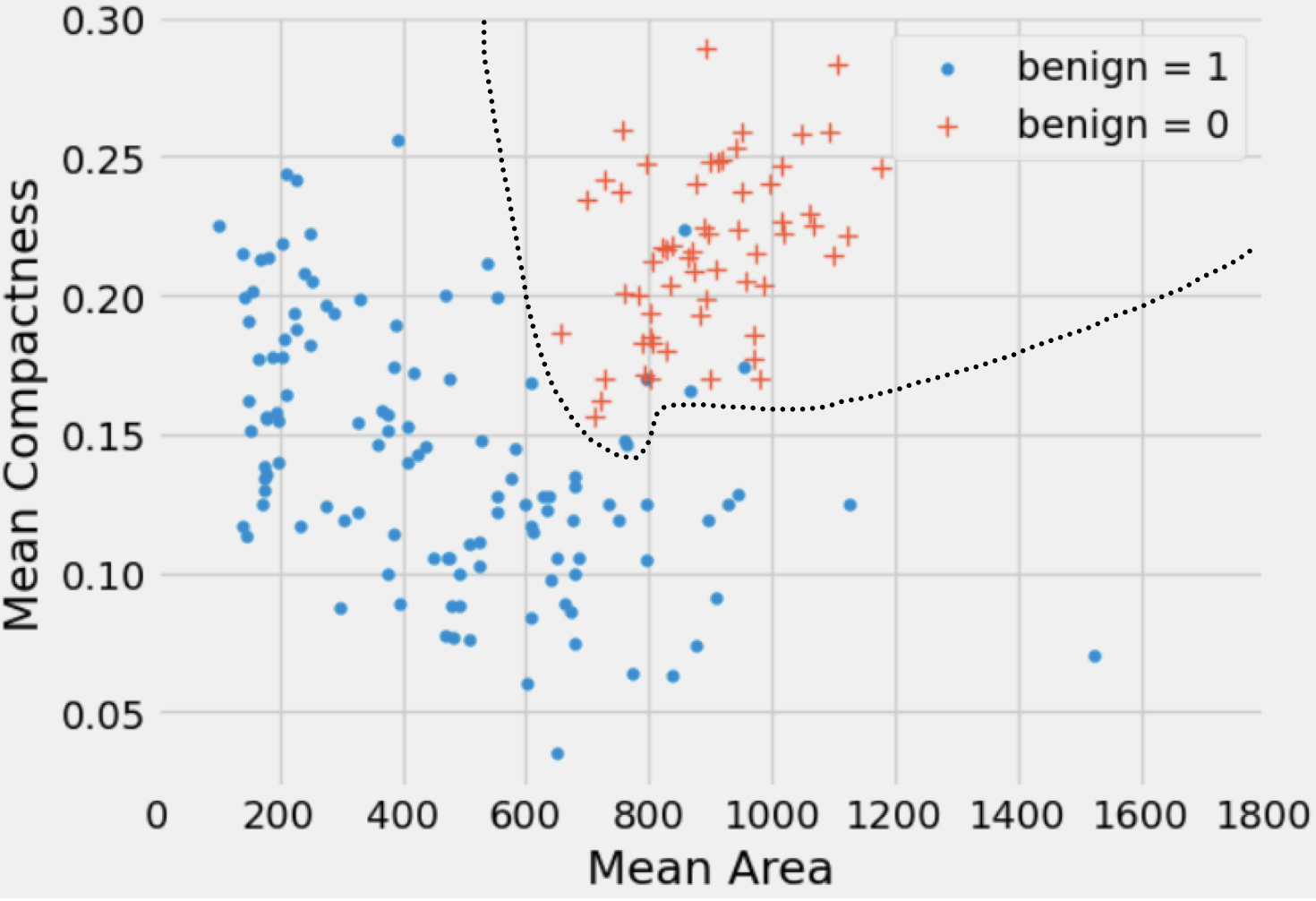
Draw the decision boundary that the k-nearest neighbors algorithm (with k = 5) would generate for this problem.

NoteUnderstanding the kNN Decision Boundary

A decision boundary is the line or curve that separates one classification region from another.

In kNN, this boundary isn’t a smooth line calculated from a formula. Instead, it’s a complex, often jagged, boundary formed by the interactions between neighboring points. While calculating every distance can be computationally expensive, for many datasets, you can simply “eyeball” where the boundary should be for a good intuitive understanding. The key idea is that any new point falling on one side of the boundary gets one label, and any point on the other side gets the other label.

Answer

A decision boundary is the plane, curve, or line that separates the classification of one class from another. It is a boundary such that if a new point falls on the one side of the boundary, it will be classified as 0 and 1 if it falls on the other side of the boundary.

For areas where the split is not so well defined, trying moving an imaginary point across the plot and see when you would change your decision on what to classify the imaginary point as!

15.2.3 (c)

Brandon suggests that Dagny should use a different k for her classifier like k = 4 or k = 8. Is Bradon’s suggestion reasonable?

Answer Not really. If we choose k to be even, we risk the danger that both classes will get the same number of votes. In that case, it would be unclear how we should decide to classify the new point.

15.2.4 (d)

Suppose Dagny obtains a training set of labeled tumors and builds a nearest neighbor classifier with k = 1. She then applies the classifier to predict the class of each point in the same training set. She notices something interesting about the results. What might she observe and why?

Answer If we use our training set to “test” our 1-nearest neighbor classifier, the classifier will pass the test 100% of the time! Each point is its own nearest neighbors. But this gives a misleading impression of how well the classifier will perform on new data. As a result, we should not use the training set to test a classifier that is based on it.

15.2.5 (e)

Suppose Dagny obtains a test set consisting of 50 data points. Should she repeatedly use her classifier on the test set, using various values of k, to obtain the value of k that yields the greatest accuracy? Explain.

Answer

The role of the test set is to have a way of understanding how well our classifier would perform in a real-world scenario with unseen data. It is important we only run our algorithm on the test data once after we are done selecting the value of k to use. Using the test set repeatedly to find the value of k that performs best can be very dangerous, as that can lead to overfitting! The classifier obtained using this process may perform well on the test set, but may do poorly on other unseen data.

Note that when we say to only run our algorithm on the test data “once”, this is referring to not changing aspects of the model (i.e., what our value of k is) after seeing how it currently performs on test data. If you were to choose “the best k” for the test data based on trial and error, this would defeat the purpose of using it as a way to evaluate how your model may do on real-world data (as we cherry-picked the best result). If you were to just re-run the Jupyter cell that tests the model on the test set though, this would be fine (in our case, you would just get the same result every time).

In this course though, we will not go into detail as to how to choose an optimal k value. For those who are curious, I encourage you to look up “validation set”!

NoteThe Golden Rule: Never Tune on the Test Set!

The training set is for building your model, and the test set is for a final, honest evaluation of its performance on unseen data. You should never use the test set to choose your model’s parameters (like picking the best value of k).

Think of it like this: * Tuning on the test set is like taking an exam, looking at the answer key, and then taking the exact same exam again. You’ll get a great score, but it’s not an accurate representation of what you actually know. A model tuned this way will likely perform poorly on truly new data.

  • How do you choose k? In practice, data scientists split their data into three sets: a training set (to build the model), a validation set (to tune parameters like k), and a test set (for the final grade).

15.2.6 (f)

Suppose in our breast tumor training dataset we have 60 benign = 0 data points and 120 benign = 1 data points. For what values of k would we always predict the same class?

Answer Using overly large values of k will result in issues such as always predicting the same value. In this example, any k greater than or equal to 121 will always predict benign = 1 no matter what.

15.2.7 (g)

Marissa suggests that we use a constant classifier which will always predict the class that is most common in the training set. In our test set, there are 15 benign = 0 data points and 35 benign = 1 data points. What will the accuracy of the constant classifier be on our test set?

Answer

\(\frac{35}{50}\) or \(70\%\).

Our constant classifier will always predict benign = 1 since it is more common in the training dataset, and the proportion of benign = 1 points in our test set is 35/50.

15.2.8 (h)

Aside from the proportion of correct classifications, what are some other metrics we might want to consider in measuring the quality of our predictions?

Answer

We might look into the relationship of the false positive/false negative rates. In different contexts, one of these types of errors might be more important than the other (e.g., in this example, we will want to consider if it is better to falsely classify a tumor as malignant when it is actually benign, or falsely classify it as benign when it is actually malignant), so it could be advantageous to tune our model to prefer one over the other. We will not dive deeply into this, but you’ll cover similar topics in Data 100!

NoteBeyond Accuracy: False Positives vs. False Negatives

Sometimes, overall accuracy isn’t the only metric that matters. It’s crucial to consider the types of mistakes a classifier makes.

  • A False Positive is when the model predicts “yes,” but the truth is “no.” (Type I Error)
  • A False Negative is when the model predicts “no,” but the truth is “yes.” (Type II Error)

Example: Cancer Diagnosis - False Positive: A benign (harmless) tumor is incorrectly classified as malignant (cancerous). This causes patient stress and leads to more, potentially invasive, testing. - False Negative: A malignant tumor is incorrectly classified as benign. This leads to a missed diagnosis and delayed treatment, which can be life-threatening.

In this context, a false negative is far more dangerous than a false positive. A good medical diagnostic model would be tuned to minimize false negatives, even if it means accepting a slightly higher rate of false positives.